Making employment law readable, and worth paying for
hrsimple was the online home of the HR Compliance Library from American Chamber of Commerce Resources: state manuals like the New York Human Resources Manual, written by employment-law firms such as Cozen O'Connor and covering more than 30 topics each, from hiring through termination. The person buying is usually an HR manager or small-business owner with one urgent question and no time for a binder. For eight years I was the only designer and developer, and my job was to make that much legal content usable, and make paying for it feel like an easy call.
- Role
- Sole designer and developer
- Timeline
- 2015 – 2022
- Worked with
- Partner employment-law firms, editors, sales, and support staff
- Research
- Staff observation, search and purchase analytics, WCAG audits and screen-reader testing
- Outcome
- 10,000 paying clients across 23 state law libraries. Staff workload cut 75 percent, and the B2B pipeline doubled from $800K to $1.6M in one year.
The buyer's real question
Nobody wakes up wanting an employment-law library. They want to know if they owe someone overtime, or what to put in a termination letter. By the time they're thinking about paying, they're asking three things:
- Does this cover my state, and my problem?
- Can I trust who wrote it, and is it current?
- Will I actually be able to find the answer once I'm in?
So the product had two jobs. Make dense legal content easy to use, and answer those three questions before asking for a credit card. The rest of this case follows one buyer through that path.
People don't buy information. They buy the confidence that they'll find the right answer fast.
Let people see it's useful before the paywall
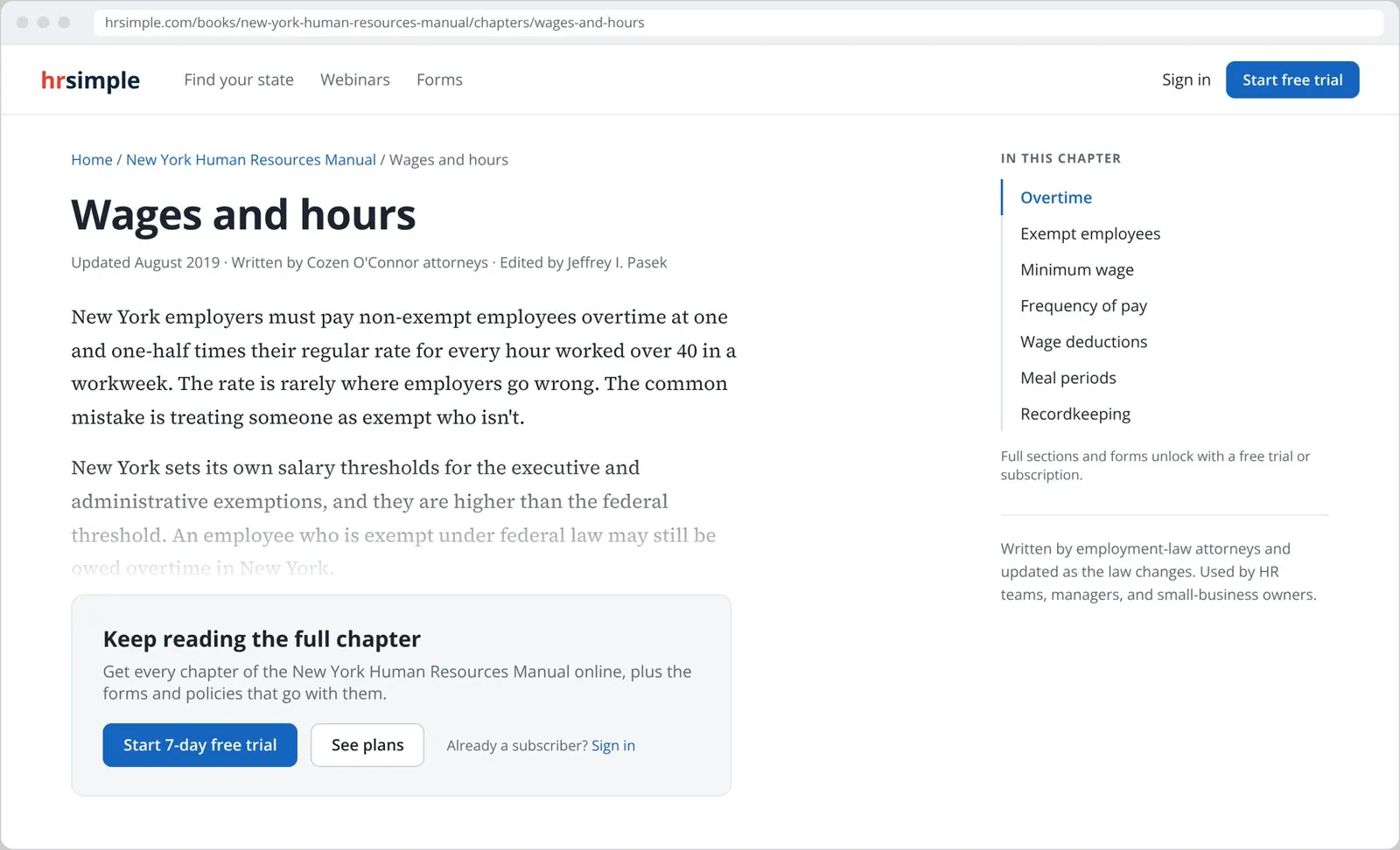
Most buyers arrived from search, straight onto a single chapter. I modeled the law as books, chapters, and sections from the first weeks of the project, so every chapter could be its own indexed page with its update date, its authors, and structured data for search engines.
Visitors get a real opening, the full outline of the chapter, and who wrote it. The gate comes after they've seen the content is good, and it offers the low-risk path first: a 7-day free trial, with a phone number for people who'd rather talk.
ThinkingA gate before any content asks for trust you haven't earned. A gate after a real answer, with the rest of the outline visible, turns curiosity into a reason to sign up.
Show everything they're buying
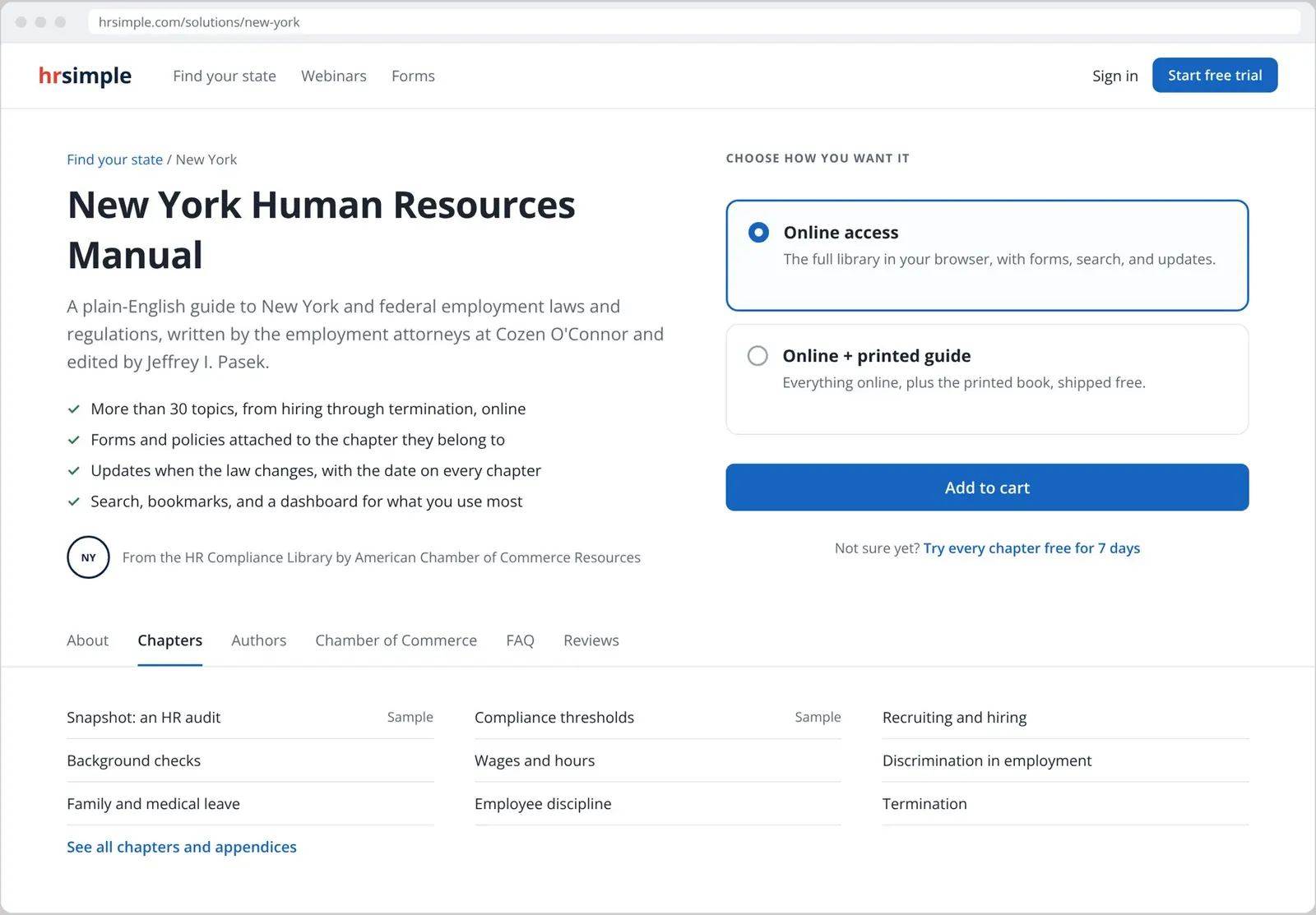
The product page answers the trust questions directly. It names the state, says which law firm wrote it and who edited it, and lists the manual's real chapters, from "Snapshot: an HR audit" to "Termination," with free samples marked.
The choice is kept to two plans with one plain difference between them: online only, or online plus the printed guide. Anyone still unsure gets the trial again, one line under the button.
ThinkingWith a dense product, the table of contents is the sales pitch. People decide by scanning for the chapter they need, so the chapter list sits right under the buy decision instead of three clicks away.
Four labeled steps, and access right away
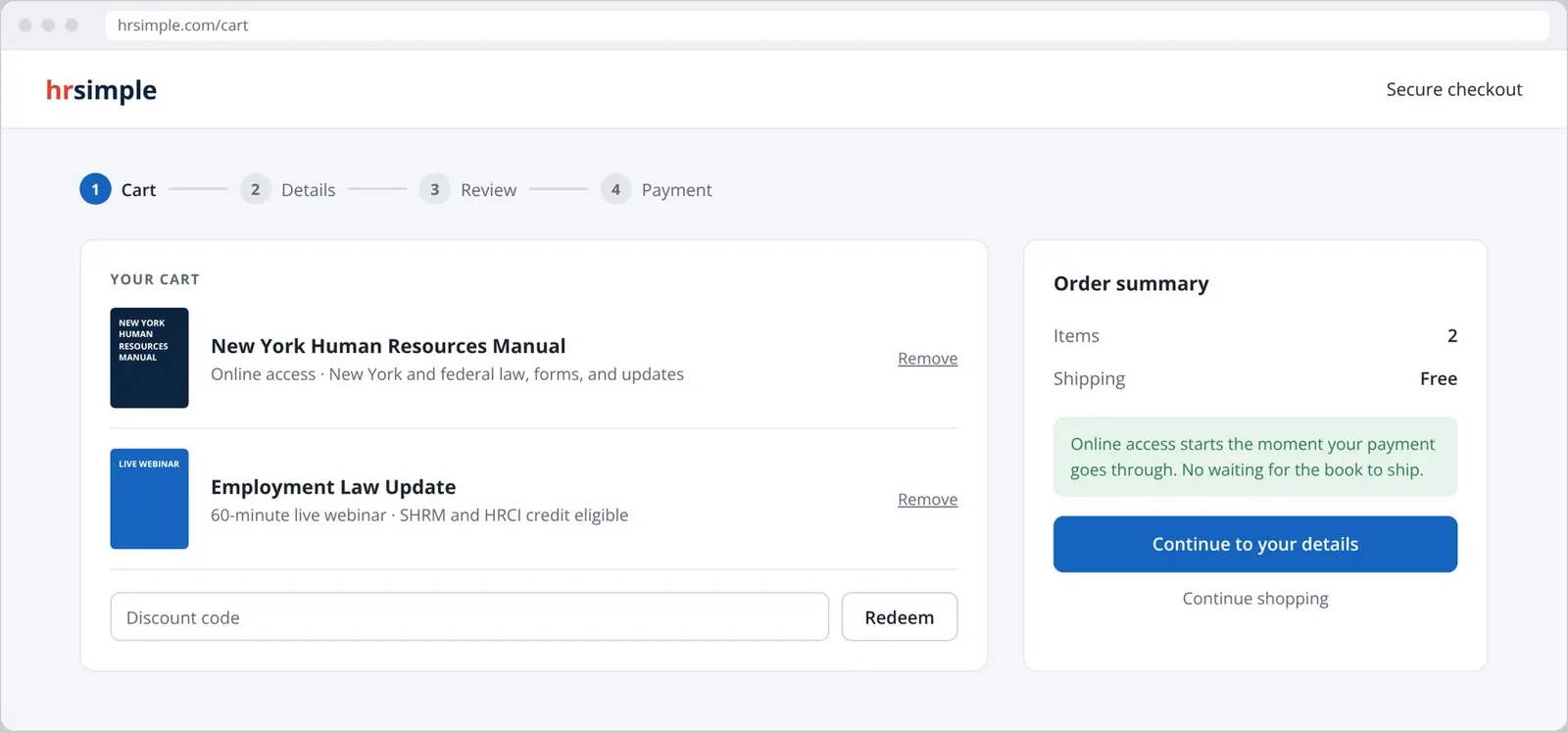
Checkout runs in four labeled steps: cart, details, review, payment. Discount codes sit in the cart, where people look for them. Shipping on the printed guide is free, so there's no surprise at the end.
Online access starts the moment payment clears, and the confirmation page links straight into the library and any webinars in the order. The book can take a few days. The answer can't.
A reader built for dense legal content
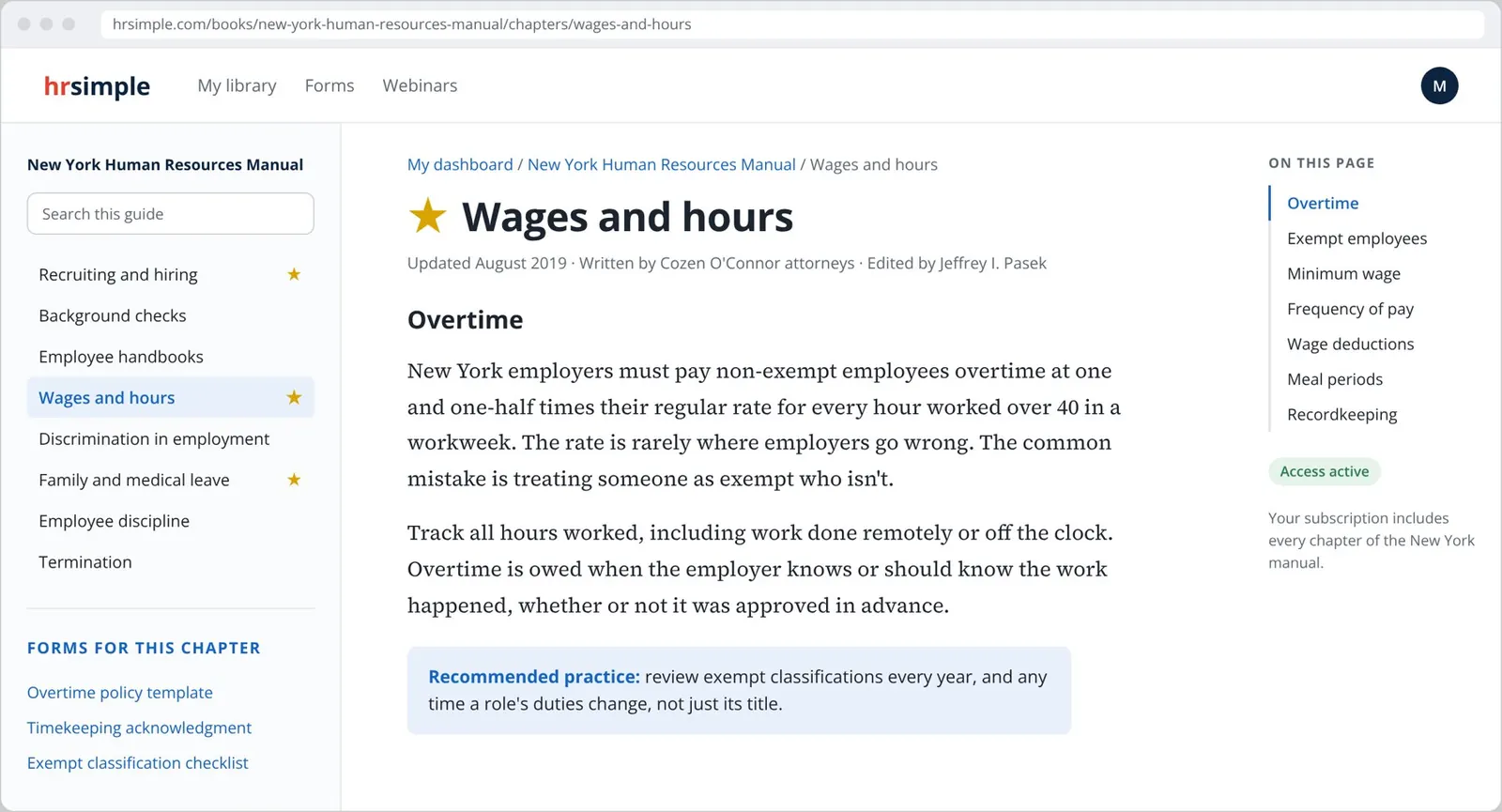
Once they've paid, the promise has to hold. The reader is where I spent the most design time, because this is the screen people come back to every week.
- Always know where you are. A breadcrumb, the full chapter list on the left, and an outline of the current chapter on the right.
- Built for reading. Long legal text set in a serif at a comfortable line length, with plain headings for each topic.
- Action next to the law. The forms and policies for each chapter sit beside it, so reading about New York overtime leads straight to the overtime policy template.
- Practice, not just rules. Recommended practices are called out separately from the legal requirements.
- Your shortcuts. Star a chapter and it shows up on your dashboard next time.
Keeping the content current, and the business running
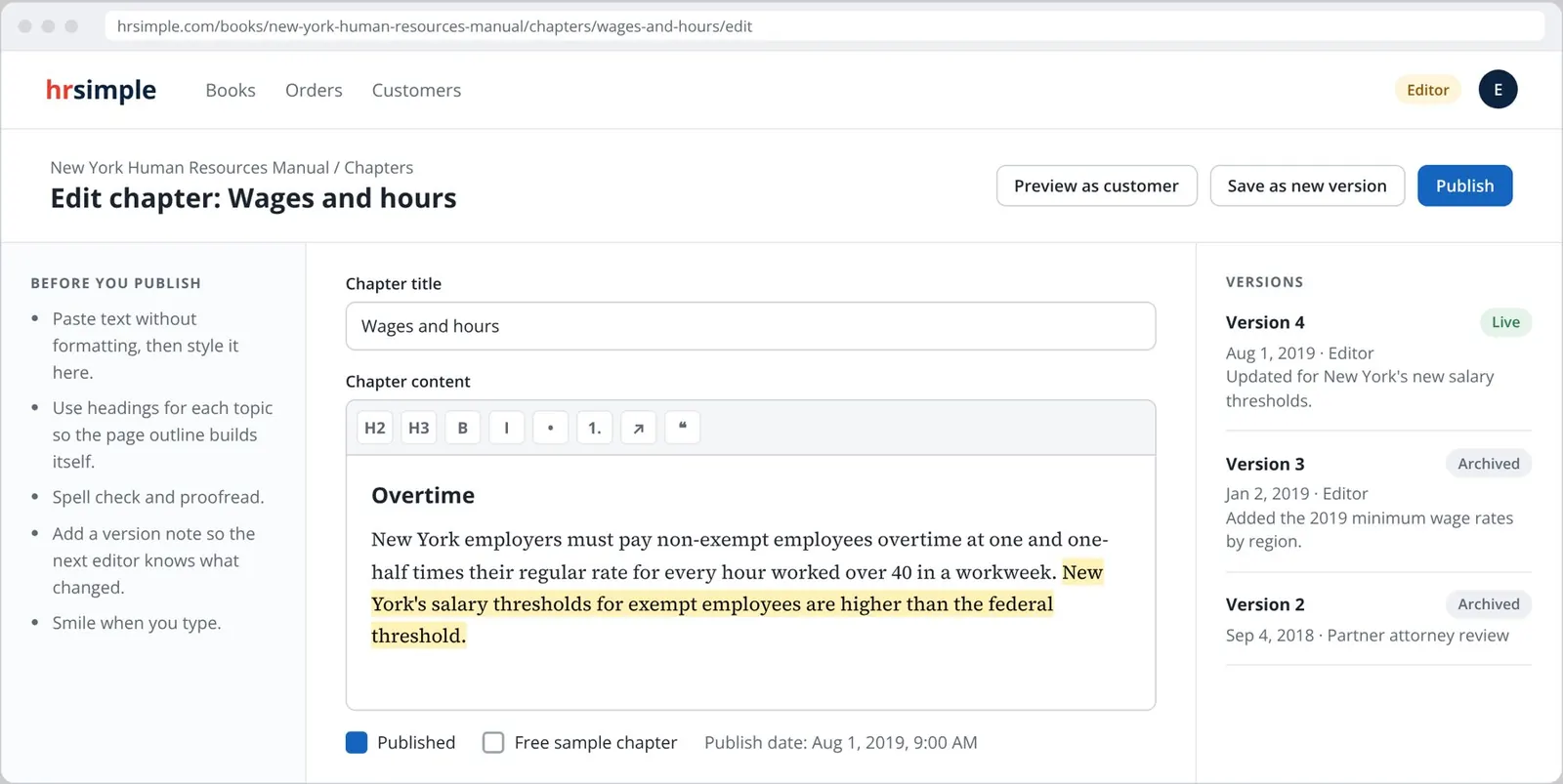
The law changes, so the content can't be static. Editors work in a simple editor with guidelines beside it, and every change is saved as a version with a note and a date, so a partner attorney can see exactly what changed and when. Any chapter can be marked as a free sample, which is what feeds Step 1.
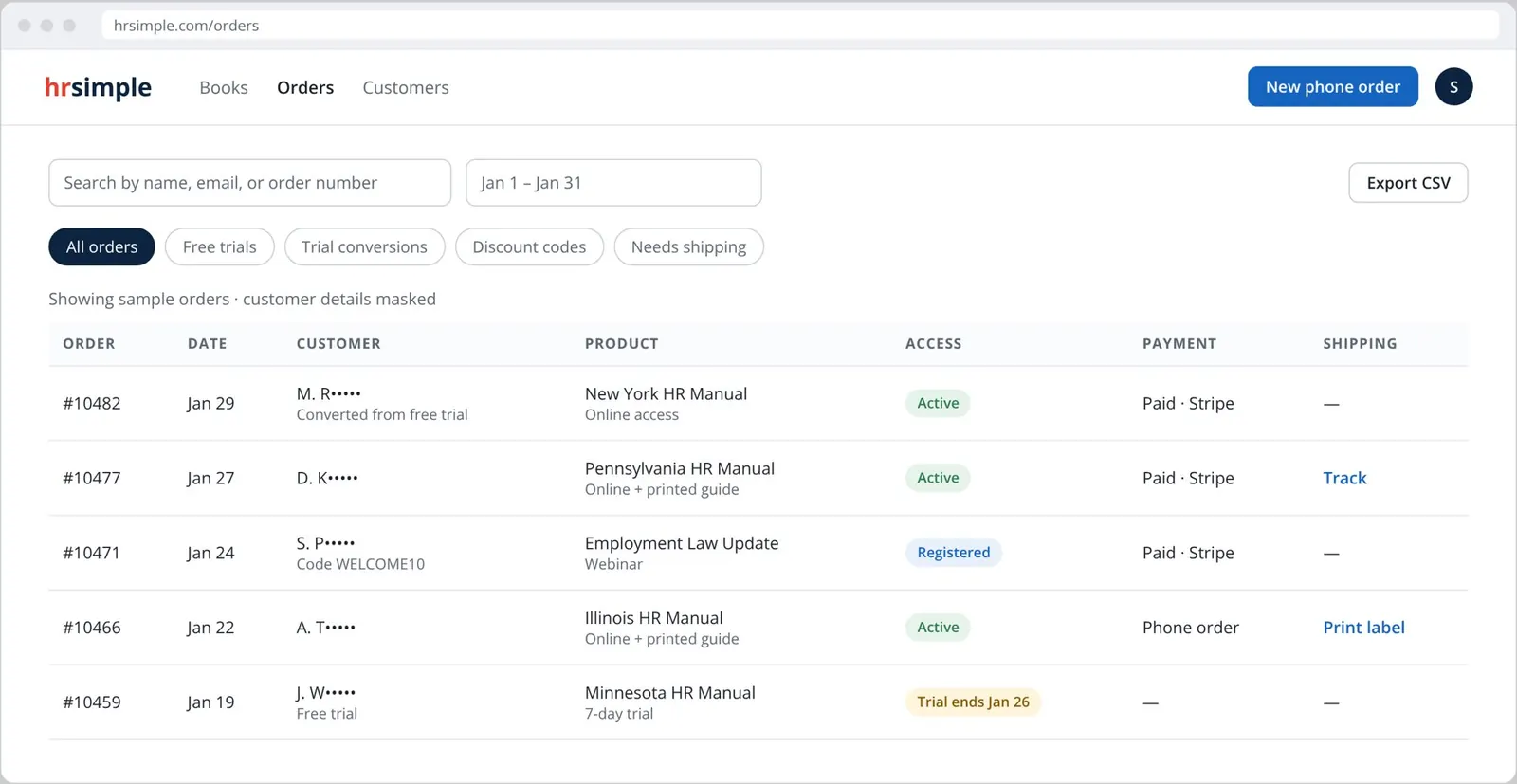
Staff were the other users. I sat with them and watched how they handled orders, renewals, trials, and shipping instead of asking what they needed. I then rebuilt the order screens around that work: one searchable table, filters for free trials and trial conversions, discount-code tracking, access status, phone orders, and shipping labels in the same place. Their workload dropped 75 percent, and the time that freed up went into sales.
Accessibility as a practice
Legal content has to work for everyone who's responsible for it. I audited every page against WCAG and tested with the NVDA screen reader, not just automated checkers. In 2021 I shipped an accessibility retrofit without a redesign: skip links, focus states, ARIA labels, and contrast fixes. I published the work as peer-reviewed research at ACM SIGDOC, showing that accessibility work also improves search visibility.
Where it landed
- A product people paid for. 10,000 paying clients across 23 state employment-law libraries, plus forms and SHRM- and HRCI-certified webinars.
- A business that ran better. Staff workload down 75 percent, and the B2B pipeline doubled from $800K to $1.6M in one year.
- A structure that lasted. The books, chapters, and sections model from the first weeks powered search, the reader, favorites, and SEO for eight years without a rebuild.
- Research others can use. A peer-reviewed paper at ACM SIGDOC '21 on accessibility and design-to-code practice.
The screens on this page are a redesign based on the production Rails views. Book titles, authors, and chapter names come from the published HR Compliance Library. Chapter text is summarized, prices are left out, and customer details are masked.
Sources: New York Human Resources Manual (ACCR, 2019), Grant, "Accountability for the hidden codes toward a better user experience," ACM SIGDOC '21